Argil AI
How to Make an AI Clone of Yourself for Videos with Argil
Recording dozens of marketing videos each month eats your time. Argil fixes this by letting you create an AI clone of yourself that generates hundreds of videos without ever filming again. The Adam model transforms a simple photo into a hyperrealistic digital twin capable of speaking, moving, and expressing emotions exactly like you. No studio, professional lighting, or constant reshoots needed. Create your clone once, then generate unlimited videos by simply changing scripts. This approach revolutionizes work for content creators publishing daily, e-commerce sellers testing multiple ad hooks, and solo entrepreneurs wanting to scale their video presence.
What is Argil and How Does AI Cloning Work?
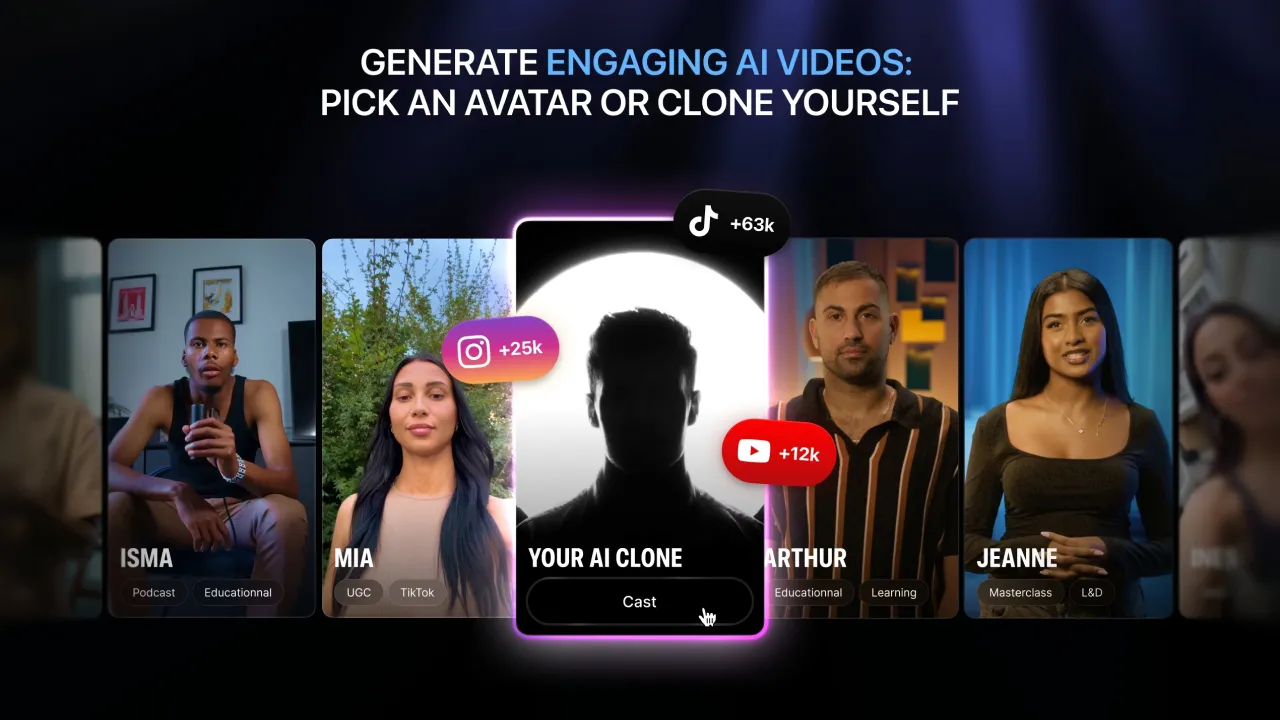
Argil is a platform that lets you create a video AI clone of yourself for scaled content production. Adam, their cutting-edge model, analyzes your appearance from a reference photo or video, then generates a digital double with your facial expressions, natural movements, and precise lip sync. Unlike tools creating inconsistent generic avatars, Argil maintains perfect visual consistency. Your clone keeps exactly the same hairstyle, clothes, and facial features in every produced video.
The system works through learning: the platform studies your visual characteristics, then trains an AI model specific to your appearance. Once your clone is created, you simply write a script and select an environment. The AI automatically generates a video where your digital double speaks your words with natural lip sync. According to their official site, over 60,000 creators already use Argil for regular content production, proving the system's effectiveness in replacing traditional filming methods.
How to Make an AI Clone of Myself with Argil?
Log into Argil and click "Avatars," then "Create new." Upload a high-quality photo of yourself with natural lighting and neutral background. Choose 9:16 format for vertical videos. Customize your clone by adjusting physical details: hairstyle, hair color, clothing, accessories. Select camera angle and environment, like "home office" or "bright studio." Generate your clone, name it, then choose from three AI voices automatically generated based on your appearance. The clone creates in under one minute and becomes your permanent digital twin.
Here's the complete process for cloning yourself digitally. Argil first asks you to provide a clear photo where your face is fully visible, preferably in natural light against a plain background. The platform analyzes your facial features, bone structure, skin tone, and proportions. This analysis allows the Adam model to recreate your appearance with uncanny precision. You can either upload an existing photo or take a new one directly from your webcam if quality suffices.
Once the photo is uploaded, you customize every aspect of your clone. Define your gender, age range (20-30, 30-40, etc.), ethnicity so the AI generates accurate skin tones. Then describe specific physical details: "medium-length wavy brown hair," "beige oversized sweater," "black round glasses." The more precise your descriptions, the more your clone will resemble your usual brand image. If you typically film in a business suit for your professional channel, create your clone in that outfit. If you're a lifestyle creator who always wears comfortable sweaters, integrate that from creation.
The system then generates your clone by analyzing all these parameters. Argil automatically creates ten different environments where your clone can appear: modern office, cozy café, recording studio, neutral background, urban exterior. You can create more at will by describing the desired ambiance. Each environment keeps your clone identical while only changing the setting. This lets you vary content without ever losing visual recognition of your "face" as a brand.
To produce your first video with your clone, select one of the generated environments, paste your script into the editor, choose video type (short for TikTok/Reels or long for YouTube), then launch generation. Argil automatically integrates professional video B-rolls from the Getty Images partnership during editing. If you mention "startup growth" in your script, the system adds shots of ascending graphs and collaborative teams. This automation transforms a simple script into a complete professional video in minutes.
Can You Create an AI Clone of Yourself Free with Argil?
No, Argil doesn't offer a permanent free plan allowing you to create and use an AI clone of yourself. The platform provides a 5-day free trial to test creating your digital twin and generating videos. After this trial period, you must subscribe to the Classic plan at $39/month (or $27/month annually) to continue using your clone. This plan includes 1,600 credits equaling approximately 25 minutes of video or 50 clips of 30 seconds monthly.
This pricing structure without unlimited free option is explained by considerable technical costs of AI cloning. Generating a hyperrealistic digital twin requires significant computing power to analyze your facial features, train a personalized AI model, then render each video with precise lip sync. The GPU servers required for these operations represent high operational expenses that platforms like Argil cannot absorb in free mode.
If you absolutely seek to create an AI clone without initial budget, you should explore alternatives like Vidnoz AI which offers a limited free tier, or open-source tools like Wav2Lip for basic lip sync. These free solutions generally produce lower quality results and require technical skills for installation. Argil focuses on immediate professional quality rather than limited freemium, explaining the absence of a permanent free plan.
Argil Features for Cloning Yourself
Hyperrealistic visual cloning of your appearance. Argil analyzes your photo to digitally recreate every detail of your face: bone structure, proportions, skin tone, eye shape, facial curves. The result produces a digital double that preserves your unique visual identity. Unlike generic avatars where everyone looks like standardized 3D characters, your Argil clone captures what makes precisely your appearance. Viewers immediately recognize it's "you" even in digital format.
Complete customization of your digital twin. You control every visual element of your clone. Add your favorite cap with your brand logo, choose the sweater you typically wear, integrate your characteristic glasses or signature jewelry. The platform accepts upload of custom visual elements to guarantee your clone perfectly reflects your personal style. A consultant who always films in a suit can create their clone in this professional attire, while a lifestyle creator can dress their digital twin in the oversized sweaters defining their aesthetic.
Voice generation adapted to your appearance. Argil produces three voice options based on your clone's visual characteristics. If you create a clone that resembles you, the system generates voices matching your supposed appearance: deep voice for a man in his forties, more dynamic tone for a young woman. You preview each option before validation. This voice-appearance consistency strengthens your clone's perceived authenticity even if it's not your actual recorded voice.
Multi-environment system for single clone. Your digital twin can appear in dozens of different environments without losing visual consistency. Create your person once, then generate preset environment packs or build your own. Your clone represents you alternately in a modern office, on a beach, in a recording studio, or against a solid background. This versatility lets you vary content while maintaining recognition of your "face" as a brand. Subscribers instantly know it's your channel even when settings constantly change.
Natural product integration in your clone's hands. Argil lets you place any physical product in your digital twin's hands or background. Simply upload your product photo, and the system integrates it realistically into the scene. Your clone can hold a book, show packaging, present a tech gadget, while maintaining natural proportions and shadows. This feature transforms UGC creation for e-commerce. Test ten different hooks with the same product in one hour without physically handling the object.
Automatic B-rolls via Getty Images. The Getty Images partnership provides millions of professional video sequences that automatically insert during editing. Write a script about "growing startup," and Argil adds collaborative team shots and ascending graphics. Mention travel, the system integrates airplane sequences and exotic destinations. This automation eliminates hours of manual B-roll searching and produces professional editing results without technical skills.
How to Generate an AI Avatar of Myself on Argil?
To generate your own AI avatar on Argil, start by taking or selecting a clear photo of yourself. Choose a well-lit image, ideally in natural light, with neutral or plain background. Your face must be fully visible, front-facing or slightly three-quarters, without sunglasses or accessories hiding your features. This photo serves as the base for AI to learn your unique appearance.
Log into Argil, access the "Avatars" section, and click "Create new." Upload your reference photo. The system then guides you through customization parameters. Define your gender, approximate age range (20-30, 30-40, 40-50, etc.), and ethnicity so skin tones are accurate. These parameters help the AI understand general demographic characteristics of your appearance.
Now add specific details that make you unique. Describe your hairstyle precisely: length, texture, color. Specify your usual clothing if you want your clone to always wear the same signature outfit. For example: "short brown hair styled to the side," "white open-collar shirt," "thin gold necklace." The more detailed your descriptions, the more your clone will capture your recognizable personal style.
Next select camera angle (frontal, three-quarters) and base environment where your clone will initially appear. Argil offers presets like "modern office," "bright studio," "urban café," or you can describe your own setting. Launch generation. The Adam model processes your photo and parameters, then produces your digital twin in under one minute. You can now use it to generate hundreds of different videos while maintaining exactly the same appearance.
Why Create an AI Clone of Yourself with Argil?
Absolute visual consistency of your clone between videos is the decisive advantage. Unlike generic avatars that subtly change from one generation to another, your Argil digital twin maintains exactly the same appearance in every production. This permanence builds solid personal brand recognition. Your viewers instantly identify your content even before reading the title, exactly as they would recognize your real face in their social feed. This uniformity becomes crucial when publishing daily. Your subscribers develop familiarity with your clone as they would with you in person.
Time savings represent the most compelling pragmatic argument. Traditionally filming ten videos of yourself requires blocking hours in your schedule, installing lighting, applying makeup, checking your appearance, retaking failed shots, then editing each sequence individually. Your Argil clone produces those ten videos in two hours. Write scripts, select appropriate settings, launch parallel generations while working on something else, then download final videos. A creator publishing three weekly videos can now output three daily videos with the same time investment.
Geographic and physical freedom transforms how you work. You're no longer prisoner of your filming studio. Sick with a hoarse voice? Your clone keeps publishing. On vacation across the world without equipment? Your digital twin maintains your social presence. Bad hair day or visible fatigue? Doesn't matter, your clone always displays the same impeccable appearance. This operational resilience eliminates publication interruptions that break algorithms and audience engagement.
Unlimited A/B testing capacity radically changes your marketing approach. Simultaneously test five versions of yourself presenting the same product with different hooks, each in distinct setting and tone. After metrics analysis, invest your ad budget only on the winning variant. This data-driven methodology replaces approximate intuitions with measurable decisions. A personal brand can discover their clone in casual wear inside a living room converts 40% better than the same clone in formal attire inside a corporate office.
Accessibility without technical skills democratizes professional video production. No expertise in editing, lighting, framing, or animation required. The interface visually guides each step from clone creation to final video export. A solo entrepreneur can produce studio-quality content without hiring videographers, cameramen, or editors. This autonomy opens regular personal video production to budgets previously totally excluded from it.
Things to Consider Before Cloning Yourself
AI clones remain identifiable as non-human to an attentive eye. Despite the Adam model's impressive realism, certain micro-movements or transitions can seem slightly artificial, particularly during rapid expression changes or pronounced head movements. This limitation primarily affects content requiring strong emotional authenticity like deep personal testimonials, sensitive announcements, or messages requiring raw human vulnerability. For standard informational, educational, tutorial, or commercial content, the realism level suffices and most viewers notice nothing abnormal.
Ethical questions and consent deserve serious reflection before creating your digital twin. You essentially generate a version of yourself that can say anything according to provided scripts. This power requires responsibility. Always inform your audience they're interacting with an AI clone rather than you directly filmed. This transparency maintains trust and avoids manipulation perceptions. Also consider who will access your clone and how it might be used. Argil includes explicit consent, but final responsibility for ethical use belongs to you.
Entry cost represents an obstacle for beginning creators or exploratory projects. Without a permanent free plan, you must invest $39/month minimum to use your clone regularly. This pricing structure is justified by complex technology and high server costs, but excludes users wanting to simply experiment with AI cloning before financially committing. If your monthly marketing budget remains below $100 or you're uncertain about regularly publishing video content, Argil investment may seem premature. First validate your format and publication cadence with more accessible methods.
Dependency on written scripts requires mastering conversational writing. Unlike improvised filming where you naturally adjust your speech, your clone speaks exactly what you write word for word. A poorly structured, overly verbose, rhythm-lacking, or artificial-sounding script will produce a boring video even with a perfect clone. This constraint advantages creators comfortable with writing but penalizes those whose strength lies in oral spontaneity and charismatic improvisation. You'll likely need to iterate several times on your first scripts to find written tone that captures your natural speaking style.
Your clone's permanence raises long-term considerations. Once your digital twin is created, it exists as long as the platform operates and you maintain your account. Consider your future personal appearance evolution. If you radically change hairstyle, clothing style, or brand image, your clone will keep your old appearance until you create a new one. This fixity can become problematic if your personal brand evolves significantly. You'll then need to decide between maintaining consistency with your old clone or investing in a new clone reflecting your current appearance.
How Much Does Argil Cost? Last Verified 01/09/2026
Argil doesn't offer a permanent free plan. The platform provides a 5-day free trial to test all features before subscribing to a paid plan. Here's the complete pricing structure verified on their official site on 01/09/2026.
Monthly plans:
| Plan | Price/month | Monthly Credits | Avatar Styles | Key Features |
|---|---|---|---|---|
| Classic | $39 | 1,600 (~25 min video) | 10 styles | 100+ Argil avatars, magic editing, API access, Fictions playground |
| Pro | $149 | 6,000 (~100 min video) | Unlimited | All Classic + style editing, priority support, fast generation |
| Scale | $499 | 18,000 (~300 min video) | Unlimited | All Pro + 3 workspace seats included |
| Enterprise | Custom | Custom | Unlimited | All Scale + branded assets, account manager, early access |
Annual plans (30% discount):
| Plan | Price/month | Annual Savings |
|---|---|---|
| Classic | $27 | $144/year |
| Pro | $104 | $540/year |
| Scale | $349 | $1,800/year |
The 1,600 credits in the Classic plan equal approximately 50 videos of 30 seconds or 25 minutes of total content according to their official documentation. Credit consumption varies proportionally based on each video's final duration. API access is included from the entry plan, representing a rare advantage in this price range. All generated videos can be used commercially without additional restrictions.
Who each plan is for:
The Classic plan targets solo creators producing 1-2 short videos daily for a single platform. Fifty 30-second monthly videos enable daily publication on TikTok or Instagram Reels with some buffer days. This capacity suits initial testing phases or low-cadence creators. The ten avatar styles limit visual variety if you regularly alternate between different contexts.
The Pro plan targets multi-platform creators publishing daily on 2-3 social networks simultaneously. Six thousand credits equal approximately 200 videos of 30 seconds, or 6-7 videos daily. Unlimited style editing becomes crucial at this production level to maintain audience engagement with varied settings. Priority support and fast generation eliminate wait times that slow intensive workflows.
The Scale plan suits agencies managing multiple clients or brands deploying massive localized content campaigns. Eighteen thousand credits allow 600 monthly 30-second videos, sufficient volume to simultaneously feed multiple accounts or massively test different ad hooks. The three included workspace seats enable team collaboration without additional per-user fees.
The Enterprise plan exclusively targets organizations needing exceptional volumes, advanced API integration, or fully branded assets. The dedicated account manager and early access to new features justify investment only if your production structure vastly exceeds Scale plan capabilities.
Argil Alternatives on Retague
HeyGen also offers realistic AI avatars with an extensive voice library and pre-built video templates. The platform excels in automatic translation with lip sync, letting you duplicate videos in dozens of languages without re-recording. If your strategy includes rapid international expansion, HeyGen offers an advantage on this specific point.
DupDub AI combines avatar generation with automatic dubbing and subtitling tools. This all-in-one approach simplifies video localization workflows. Pricing tends to be slightly lower than Argil for comparable features, making it an option to consider if your budget remains limited.
Synthesia remains the historical market leader with the largest variety of pre-existing professional avatars. If you want to avoid creating a custom avatar and prefer selecting a virtual spokesperson from a library, Synthesia offers the widest choice. The platform particularly suits e-learning training and corporate presentations.
Conclusion
Argil transforms video production into a scalable process through AI avatars whose visual consistency equals human presenters. The Adam model pushes realism limits with natural expressions and precise lip sync. This technology perfectly suits creators publishing daily short content, e-commerce sellers multiplying ad tests, and agencies producing at scale for clients.
The platform shines particularly when you've already validated your format and seek to accelerate production. Getty automatic B-rolls, multiple styles, and native product integration eliminate technical frictions slowing traditional workflows. Invest your time in content strategy and impactful script writing rather than filming logistics.
Visit Argil to test the platform and evaluate if it matches your video production needs.
Appendix: Sources
Pricing:
- Official URL: https://www.argil.ai/pricing
- Verification date: 01/09/2026
User reviews:
- Trustpilot US: No reviews available as of 01/09/2026
- G2: No reviews available as of 01/09/2026
- Capterra US: No reviews available as of 01/09/2026
Official documentation:
- Official site: https://www.argil.ai/
- Comparisons: https://www.argil.ai/argil-vs-competitors