Higgsfield AI
Higgsfield AI: Create Viral TikTok Videos Quickly with Professional Camera Moves
You're scrolling TikTok and that video stops you cold. The Matrix-style bullet time rotation. The smooth crash zoom that makes backgrounds collapse while the subject stays sharp. Those impossible camera angles that look like they cost thousands.
They didn't. Higgsfield AI generated them in 30 seconds.
This San Francisco startup raised $58 million to solve one problem: giving creators Hollywood-level camera control without the Hollywood budget. We're talking 50+ professional camera movements (crash zooms, crane shots, FPV drone perspectives) that used to require a full production crew and expensive equipment.
But here's what nobody tells you. The free tier barely exists. The "unlimited" plans hide battery systems that throttle your generation speed. That sensitive content filter blocks wolverine claws as dangerous. And their Trustpilot score sits at 3.2 out of 5 stars with 271 reviews raising serious concerns about refund policies and unexpected charges.
Worth exploring? Absolutely. Your miracle solution? Let's get real.
What Is Higgsfield AI and How Does It Work?
Higgsfield AI transforms static images into 5-second video clips with cinematic camera movements. Founded in 2023 by Alex Mashrabov, former Head of Generative AI at Snap, the platform operates on a simple premise: upload a photo, select a camera preset, get a professional video clip.
Unlike text-to-video generators that guess at your vision, Higgsfield gives you direct control. You want a bullet time rotation around your product? Select "Bullet Time Scene." Need that Hitchcock vertigo effect? Choose "Dolly Zoom In." The AI executes the exact camera movement you specified with Hollywood-level precision.
The platform integrates multiple AI models under one roof. WAN 2.5 handles voice-synced talking videos. Sora 2 from OpenAI delivers photorealistic motion. Kling 2.6 excels at audio-visual sync. Google's Veo 3.1 creates authentic UGC-style content. Proprietary models like Higgsfield Soul and Nano Banana Pro round out the toolkit.
Higgsfield claims 11 million users within five months of launch, generating 1.2 billion social media impressions. Those numbers explain why creators keep returning despite the platform's rough edges.
How to Create TikTok Videos with Higgsfield AI
Creating your first video takes under 10 minutes. Head to higgsfield.ai and create an account. You'll receive daily free credits (enough for a couple of test generations before hitting the paywall).
Navigate to "Create Video" and upload your source image. Image quality matters here. Feed it a blurry phone pic and you'll get blurry output. Browse the camera movement library. Each preset shows a motion preview. "Crash Zoom" rushes toward your subject with dramatic intensity. "Crane Over The Head" swoops overhead for cinematic drama. "FPV Drone" simulates an aerial flythrough.
Add a concise prompt describing what should happen (one or two sentences work best). Hit "Enhance" if you want AI to expand your prompt automatically. Select generation settings. Standard mode uses fewer credits but takes 7-10 minutes. Turbo mode burns credits faster but delivers in under 60 seconds.
Generate and wait. Download your MP4 once processing completes. The entire workflow takes 15 minutes on standard speed or under 2 minutes with Turbo enabled.
Key Features That Set Higgsfield Apart
50+ Professional Camera Movements
The camera preset library is Higgsfield's killer feature. These aren't arbitrary movements. They're actual cinematography techniques from professional productions. Crash zooms deliver Michael Bay intensity. Crane shots provide cinematic drama. Snorricam creates that trippy "frozen character while world moves" effect from Requiem for a Dream.
Each preset applies authentic physics. Dolly movements track smoothly like a camera on rails. Dutch angles tilt at precisely the right angle for psychological unease. This level of control simply doesn't exist in competing tools.
Multi-Model AI Integration
Higgsfield doesn't lock you into one AI model. WAN 2.5 specializes in lip-sync and voice generation (perfect for talking avatar videos). Sora 2 delivers photorealistic motion. Kling 2.6 handles audio-visual sync better than alternatives. Google's Veo 3.1 excels at UGC-style authentic content.
Different jobs need different tools. Product showcases work better with Higgsfield Soul for consistent character rendering. TikTok transitions benefit from Kling's seamless motion. This flexibility prevents the "everything looks AI-generated" problem.
Cinema Studio Workflow
Cinema Studio goes beyond basic generation. You configure a virtual camera rig (selecting sensor type like Arri Alexa 35, lens characteristics, focal length). Generate a batch of static "hero frames" first. Lock your favorite as the reference anchor.
The video engine inherits exact facial geometry, wardrobe, and lighting from your locked frame. This maintains consistency across multiple generations (critical for multi-shot sequences where the same character must appear identical).
Visual Effects and Transitions
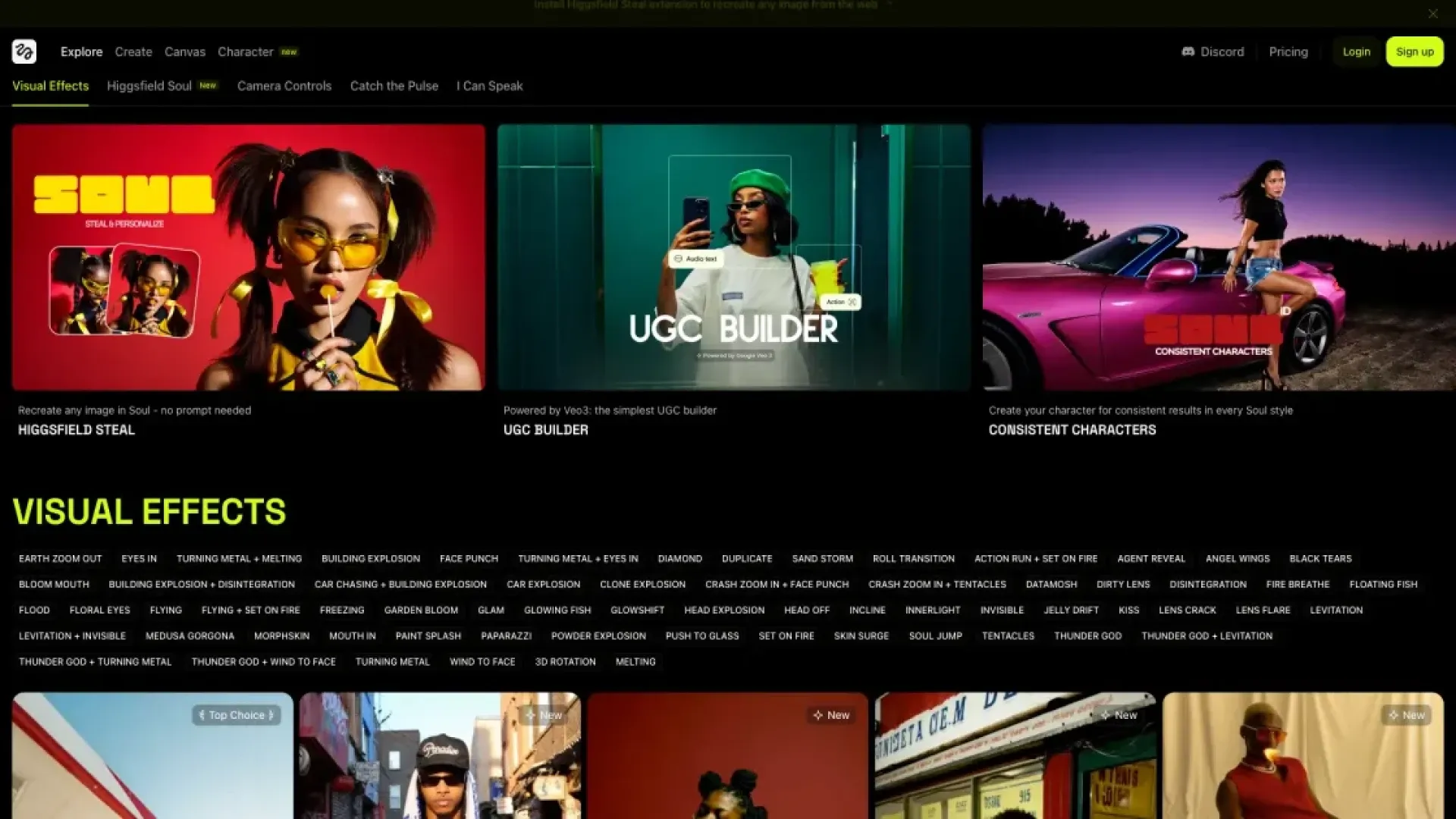
Beyond camera movements, Higgsfield packs visual effects presets. Fire elements engulf subjects in flames. Ice transformations crystallize scenes. "Melting Doodle" liquefies characters into paint drips. "Bullet Time Splash" combines frozen action with explosive water effects.
The transitions deserve special mention. "Raven Transition" morphs subjects into black birds. "Hand Transition" makes scenes fold into origami. These aren't cheesy filters. They're composited effects that normally require After Effects expertise.
Higgsfield AI Pricing and Plans
Higgsfield operates on a credit system. Different operations consume different credit amounts. Here's verified pricing as of January 2026:
| Plan | Price | Monthly Credits | Video Generations | Key Features |
|---|---|---|---|---|
| Free Tier | $0/month | Daily credits (variable) | 2-3 videos | Watermarked exports, basic models only |
| Basic | $9/month | 150 credits | 6-10 videos | No watermark, commercial use, priority support |
| Pro | $39/month | 700 credits | 20-35 videos | Priority model access, everything in Basic |
| Ultimate | $79/month | 1500 + 200 bonus | 50-80 videos | Unlimited Nano Banana Pro, exclusive presets |
Credit costs vary wildly by model. Higgsfield Soul images cost 0.25 credits. WAN 2.5 videos consume 20-50 credits based on duration. Premium models like Kling O1 Edit burn 150+ credits for a single 10-second clip. This variability makes budgeting tricky.
Credits reset monthly with no rollover. Annual billing offers roughly 40% savings but locks you into a year-long commitment (a commitment many Trustpilot reviewers regret making given the controversial refund policies).
Pros and Cons of Higgsfield AI
Strengths
Unmatched camera control. The 50+ professional presets deliver Hollywood-level results that competing platforms simply can't match. You get precise directorial control over every shot.
Multi-model flexibility. Access to Sora 2, Kling 2.6, WAN 2.5, and Veo 3.1 in one platform eliminates the need for multiple subscriptions. Different models excel at different tasks.
Fast generation speed. Turbo mode delivers results in under 60 seconds. Standard mode takes 7-10 minutes. Both timelines beat traditional video production by miles.
Professional output quality. When it works, the cinematic results are genuinely impressive. Smooth motion, proper physics, and professional-grade visual effects.
Limitations
5-second video maximum. Every clip maxes out at 5 seconds. Want a 15-second TikTok? Generate three separate clips and stitch them together. This triples credit consumption and creates consistency issues.
720p resolution only. Default output is 1280x720 pixels. In 2026. This works for TikTok on phones but looks soft on larger screens or in professional projects.
Overzealous content filtering. The sensitive content system blocks legitimate prompts. "Wolverine claws" triggers warnings. "Explosive energy" gets flagged. Every blocked generation still consumes credits with no refund.
Misleading "unlimited" claims. Ultimate plans advertise unlimited generation but hide a battery system. Generate too quickly and your battery drains, throttling you to one generation every few minutes.
Controversial refund policy. Higgsfield deducts a 6% "processing fee" from all refunds and takes 2-3 weeks to process. Many users report refund denials even for same-day cancellations with zero usage.
Higgsfield AI Alternatives
If Higgsfield doesn't match your needs, consider these alternatives:
Runway Gen-3 specializes in longer video generation (up to 10 seconds) with higher resolution output. The interface is more complex but offers deeper professional controls. Pricing starts at $15/month.
Kling AI provides 66 free daily credits and generates videos up to 2 minutes long. Image quality surpasses Higgsfield according to independent benchmarks. The major drawback? Generation times can exceed 3 hours during peak usage.
Pika Labs focuses on stylized creative shorts with fast generation and intuitive controls. Better for artistic experimentation than photorealistic commercial content. More affordable at the entry level.
Conclusion: Is Higgsfield AI Worth It?
Higgsfield AI delivers on its core promise: professional camera movements that were previously impossible for solo creators. The 50+ cinematic presets, multi-model integration, and fast generation speed make it a powerful tool for TikTok creators, e-commerce sellers, and social media marketers who need dynamic video content quickly.
But the platform has serious flaws. The 5-second limit feels arbitrary in 2026. The 720p resolution disappoints. The overzealous content filter wastes credits on false positives. And that 3.2/5 Trustpilot score reflects genuine customer service issues around refunds and billing transparency.
Higgsfield works best for creators who understand its limitations going in. Start with the Basic plan ($9/month) to test whether the platform matches your workflow. Avoid annual commitments until you're certain. Budget more credits than you think you'll need because failed generations and content blocks eat into your monthly allocation.
For TikTok creators prioritizing speed and cinematic effects over resolution, Higgsfield delivers value. For professional projects requiring longer clips or HD output, explore Runway or Kling AI instead.
👉 Try Higgsfield AI at https://higgsfield.ai